

Incoming Webhooks
Klokku supports incoming webhooks to change a current budget item.
This feature simplifies automating change of a budget item, based on external events or data.
For example, you can set up a webhook to automatically set your budget item to work when turning on your work computer or to commute when leaving the office.
Klokku can generate a special URL for each budget item that looks like this:
When this URL is called with a POST request, Klokku will change the current budget item to the item related to the webhook URL.
Enable budget item Incoming Webhook
Section titled “Enable budget item Incoming Webhook”To enable a budget item webhook:
- Go to the budget plans page -
- Click on the chosen budget item name.
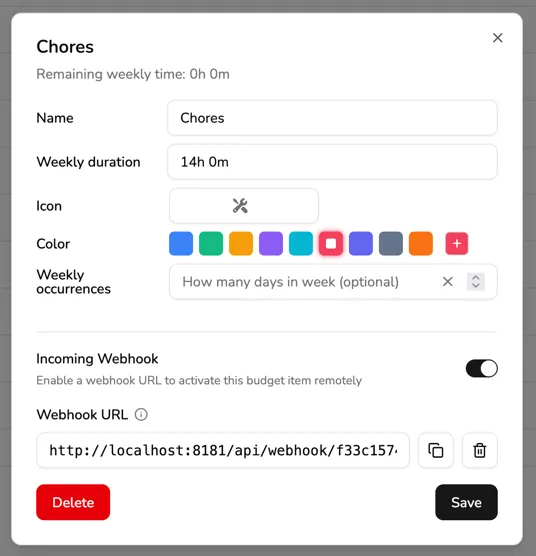
This will open the budget item details page. - Toggle the “Incoming Webhook” switch.
The Webhook URL will be displayed in the budget item details page, under the “Webhook URL” section.
How to call the Incoming Webhook
Section titled “How to call the Incoming Webhook”You can call the webhook URL with any HTTP client. These kinds of clients are available in many automation tools like Home Assistant, Zapier, IFTTT, n8n, Android Tasker, etc.
To test the webhook, you can use the curl command:
curl -X POST https://app.klokku.com/api/webhooks/SECRET_TOKENcurl -X POST https://app.klokku.com/api/webhooks/SECRET_TOKENThis command works on Windows 10 version 1803 and later.
curl.exe -X POST https://app.klokku.com/api/webhooks/SECRET_TOKEN